How to Use WhatsApp QR Code for Business to Get Customers
How to Use WhatsApp QR Code to Get Customers
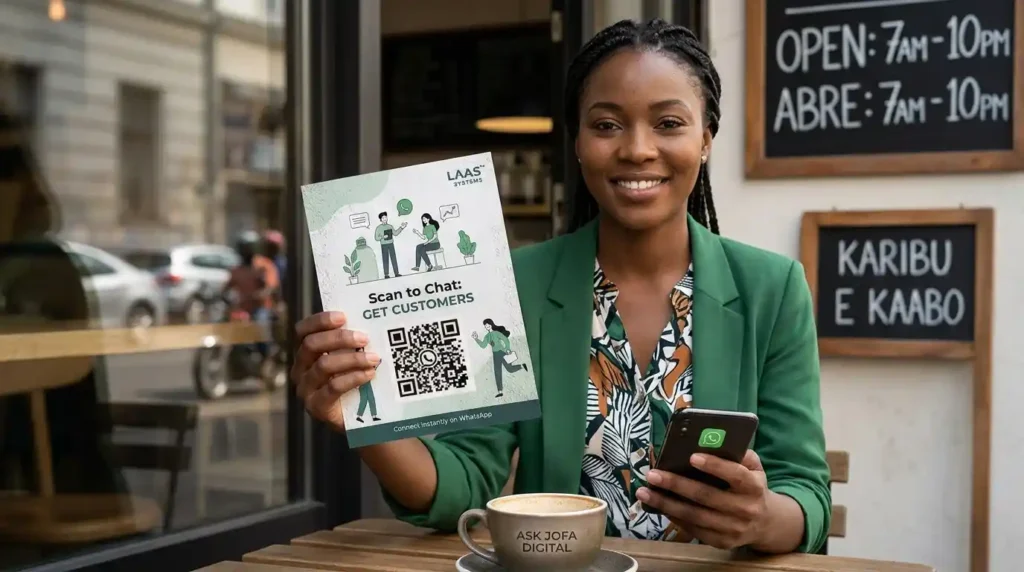
Direct answer: A WhatsApp Business QR code gives customers a fast way to move from seeing your business to starting a WhatsApp conversation. You can display it on shop signage, flyers, menus, packaging, receipts, business cards, event materials, websites, social media, and other customer touchpoints.
The real value is not the QR code itself. It is the connection between attention and conversation.
Someone sees your business offline, scans the code, opens WhatsApp, and starts a conversation with you. That conversation can become an enquiry, booking, quotation request, order, consultation, repeat purchase, referral, or another qualified business opportunity.
For professionals, the same principle can support Get Hired™. For consultants and service providers, it can support Get Clients™. For founders, SMEs, retailers, restaurants, and other businesses, it can support Get Customers™.
This guide explains how WhatsApp Business QR codes work, how to create and share yours, where to place it, how to use pre-filled messages, how to connect QR codes to an acquisition system, what to measure, and how to avoid turning your QR code into nothing more than a decorative square.
Watch the Practical WhatsApp QR Code Walkthrough
The accompanying video demonstrates the process directly inside WhatsApp Business, including how to:
- Open the WhatsApp Business tools
- Find the Short link section
- View the native QR code
- Share the QR code
- Send it through WhatsApp
- Add a message to accompany the QR code
- Download and print the QR code
- Use it on flyers, receipts, posters, websites, and other customer touchpoints
- Turn offline interactions into ongoing WhatsApp conversations
The practical demonstration reinforces an important point: the technology is simple; the acquisition strategy determines how useful it becomes.
Video Chapters: How to Use WhatsApp QR Codes to Get Customers
What Is a WhatsApp Business QR Code?
A WhatsApp Business QR code is a scannable code associated with your WhatsApp Business account. A customer can scan the code and use it to start a conversation with your business instead of manually finding and entering your phone number.
WhatsApp describes Business QR codes as a way for existing and new customers to discover and contact a business through the WhatsApp Business app. WhatsApp also states that the unique business QR code does not expire unless it is reset or the WhatsApp Business account is deleted.
That makes the QR code particularly useful as an offline-to-online acquisition bridge.
Think about the journey:
Physical attention → QR scan → WhatsApp conversation → qualification → offer → transaction → follow-up → repeat business
Without the QR code, there may be several points of friction between seeing the business and contacting it.
The customer may have to:
- Remember your business name
- Search for your website
- Find your phone number
- Save the number
- Open WhatsApp
- Search for the saved contact
- Decide what to say
- Start the conversation
A QR code compresses much of that journey into one action.
Why WhatsApp QR Codes Are Useful for Customer Acquisition
The strongest use of a WhatsApp QR code is not simply “making it easy to contact us.”
It is capturing intent at the moment it exists.
A person looking at your restaurant menu may have a question about an order.
A person standing in your shop may want to know whether another product is available.
A person attending your exhibition booth may want your pricing information.
A person holding your business card may want to discuss your service later.
A person looking at your product packaging may need customer support.
These are different situations, but the underlying acquisition mechanism is similar:
The prospect already has some level of interest. The QR code gives that interest a direct route into a business conversation.
This is why WhatsApp QR codes can be particularly valuable for businesses with physical customer interactions.
The Offline-to-Online Customer Acquisition Model
A useful way to understand WhatsApp QR code marketing is to separate the process into five stages:
1. Attention
The customer encounters your business.
This can happen in a:
- Shop
- Restaurant
- Office
- Event
- Exhibition
- Market
- Billboard
- Flyer
- Business card
- Product package
- Receipt
- Vehicle
- Printed advertisement
2. Action
The customer sees a clear instruction such as:
Scan to order on WhatsApp
or:
Scan to chat with our team
The instruction matters because a QR code without context does not explain what happens after scanning.
3. Conversation
The scan takes the customer into a WhatsApp conversation.
The objective is to remove unnecessary friction between interest and communication.
4. Qualification
The business determines what the customer actually needs.
For example:
- Product enquiry
- Service enquiry
- Booking
- Order
- Quote
- Customer support
- Consultation
- Event registration
- Partnership enquiry
5. Conversion and Retention
The conversation can then move toward the appropriate commercial outcome.
That may be:
Get Customers™ for a business.
Get Clients™ for a consultant.
Get Hired™ for a professional.
The important point is that the QR code is only the entry point. The acquisition system continues after the scan.
How to Get Your WhatsApp Business QR Code
WhatsApp Business provides a native QR-code function.
According to WhatsApp’s current help documentation, you can access the QR code through the WhatsApp Business Tools → Short link → View QR Code flow. WhatsApp also provides a QR-code icon through account settings on supported versions.
The exact interface can vary between Android, iPhone, and different app versions, but the underlying process is straightforward.
On WhatsApp Business
- Open your WhatsApp Business account.
- Go to Tools.
- Open Short link.
- Select View QR Code.
- Your business QR code will appear.
- Use the available sharing option to send or save the code.
WhatsApp also allows businesses to share the QR code directly with contacts or through other apps. It can be distributed by text or email and printed for physical display.
WhatsApp Business QR Code Help Center
The Exact WhatsApp Business QR Code Workflow Shown in the Video
The accompanying video demonstrates the practical process directly from WhatsApp Business.
The walkthrough starts with the central idea:
Your WhatsApp QR code can connect offline customers directly to your WhatsApp.
The video then demonstrates the navigation:
WhatsApp Business → Tools → Short link → View QR Code
Once the QR code is displayed, it can be captured, shared, or used as a printed customer-acquisition asset.
The video uses ASK JOFA Digital as the business example and demonstrates how someone can scan the code and immediately begin a WhatsApp conversation.
This is important because the QR code is not being treated as an isolated graphic.
It is being treated as a customer access point.
How to Share Your WhatsApp Business QR Code
Once you have opened your QR code, WhatsApp provides options for sharing the code or its associated link.
You can distribute it through:
- Messaging applications
- Printed materials
- Your website
- Social media
- Business cards
- Physical storefronts
WhatsApp officially supports sharing the QR code and link digitally and printing the code for display at physical business locations.
In the video walkthrough, the process is demonstrated by selecting the share option and sending the QR code through WhatsApp with an accompanying message.
That creates another useful acquisition pattern:
Existing conversation → QR code → new conversation opportunity
Where Should You Put a WhatsApp QR Code?
The answer depends on where customers encounter your business.
The QR code should be placed where attention and commercial intent intersect.
1. Shop Signage
If you operate a physical shop, place a WhatsApp QR code where customers can easily see it.
For example:
Need help?
Scan to chat with us on WhatsApp.
This is particularly useful when customers are browsing but have not yet approached a member of staff.
2. Business Cards
A business card traditionally gives someone your name, phone number, email address, and website.
A WhatsApp QR code can add a direct conversation path.
Instead of expecting the recipient to manually save your number, they can scan and initiate contact.
For professionals and consultants, this can turn a physical networking interaction into a digital relationship.
3. Restaurant Menus
Restaurants can use QR codes for:
- Ordering
- Booking
- Questions
- Customer support
- Feedback
- Catering enquiries
A menu QR code should have a specific instruction rather than simply saying “WhatsApp.”
For example:
Scan to order on WhatsApp
The clearer the action, the easier it is for the customer to understand why they should scan.
4. Table Tents
Restaurants, cafés, hotels, lounges, and other hospitality businesses can put QR codes directly on tables.
The customer is already physically present.
The QR code simply creates another communication channel.
5. Product Packaging
A product package is another powerful customer touchpoint.
You could use the QR code for:
- Product support
- Usage questions
- Warranty enquiries
- Reordering
- Complaints
- Feedback
- Accessories
- Customer service
The customer does not have to search for your support number.
6. Receipts
Receipts are often treated as the end of a transaction.
Strategically, they can be the beginning of the next interaction.
A QR code could invite customers to:
Scan to contact customer support
or:
Scan to reorder on WhatsApp
or:
Scan if you need help with your purchase
This extends the relationship beyond the point of sale.
7. Flyers and Brochures
A flyer can generate attention but leave the customer with a problem:
What do I do next?
A WhatsApp QR code can provide the next step.
Instead of:
Call us for more information
you can provide:
Scan to ask a question on WhatsApp
This can be particularly useful for local businesses and service providers.
8. Events and Exhibitions
Trade shows, conferences, exhibitions, seminars, and networking events create large numbers of short interactions.
A QR code can reduce the friction involved in exchanging contact information.
You could use:
Scan to receive the product catalogue
Scan to request pricing
Scan to book a consultation
Scan to receive event updates
This creates a digital continuation of an offline interaction.
9. Store Windows
A storefront QR code can continue working even when the business is closed.
Someone passing by can scan the code and start a conversation.
The important consideration is response management.
If the customer expects an immediate answer but your business is closed, communicate your availability clearly.
10. Product Displays
A QR code beside a product can provide a direct path to questions.
For example:
Questions about this product? Scan to chat.
This can be more useful than sending the customer to search through a website.
11. Vehicles
Businesses that operate delivery vehicles, service vehicles, taxis, trucks, or branded company cars can potentially use QR codes to convert exposure into direct communication.
The code should be large enough to scan safely when the vehicle is stationary and should communicate a specific action.
12. Social Media and Email
A QR code does not have to remain offline.
WhatsApp officially identifies social media and email signatures among possible uses for business QR codes.
The broader principle is:
Put the conversation entry point wherever customer attention already exists.
How to Use a Pre-Filled WhatsApp Message
One of the most useful features of a WhatsApp Business QR code is the ability to provide a default message.
When someone scans your QR code, they can be presented with a pre-populated message that they can edit before sending.
WhatsApp currently states that business owners can create and edit this default message, with a 140-character limit.
This is important because the hardest part of starting a conversation is sometimes deciding what to say.
A blank WhatsApp message creates a small but unnecessary decision.
A relevant pre-filled message removes that decision.
For example:
Hi, I would like to know more about your products.
Or:
Hi, I would like to place an order.
Or:
Hi, I would like to book a consultation.
Or:
Hi, I need help with my recent purchase.
The customer can still edit the message before sending it.
WhatsApp instructions for editing the default QR-code message
Why the Message Should Match the Placement
Do not necessarily use one generic message everywhere.
The context of the QR code should determine the conversation.
Consider these examples:
| QR Code Location | Better Conversation Starter |
|---|---|
| Restaurant menu | I want to place an order |
| Product packaging | I need help with this product |
| Business card | I’d like to discuss your services |
| Event booth | I’d like to receive more information |
| Store receipt | I have a question about my purchase |
| Service flyer | I’d like to request a quote |
| Booking location | I’d like to make a booking |
This creates a simple but powerful principle:
The QR code should tell WhatsApp why the person is contacting you.
That improves the context of the conversation from the beginning.
QR Code Alone vs QR Code + Clear Call to Action
A common mistake is printing a QR code without telling people what it does.
The customer sees:
[QR CODE]
And has to guess.
Instead, give the QR code an explicit instruction.
Examples:
Scan to order on WhatsApp
Scan to chat with our sales team
Scan to request a quote
Scan to book an appointment
Scan for customer support
Scan to ask about availability
Scan to get today’s offer
The QR code is the mechanism.
The call to action explains the value.
The QR Code Should Lead to a Specific Business Outcome
The stronger question is not:
“Where can I put my QR code?”
It is:
“What should happen after someone scans it?”
That changes the way you design the system.
For example:
QR code → WhatsApp → Order
is different from:
QR code → WhatsApp → Booking
which is different from:
QR code → WhatsApp → Quote request
and different again from:
QR code → WhatsApp → Customer support
Each requires a different conversation structure.
WhatsApp QR Codes for Retail Customer Acquisition
For retail businesses, the QR code can connect physical shoppers to the business digitally.
Consider a customer who enters your shop but does not purchase.
Without a mechanism for continued contact, that interaction may simply end.
A WhatsApp QR code gives you another possible path:
Store visit → QR scan → WhatsApp contact → relevant follow-up → future purchase
The same mechanism can be used after a purchase:
Purchase → QR scan → WhatsApp contact → support → reorder → repeat customer
The objective is not to message people indiscriminately.
The objective is to make it easy for interested customers to voluntarily start a relationship with your business.
WhatsApp QR Codes for Restaurants
Restaurants have particularly clear use cases because customers are already interacting with menus, tables, receipts, packaging, and physical locations.
A restaurant could deploy separate QR-code touchpoints for:
- Ordering
- Reservations
- Catering
- Customer support
- Feedback
- Delivery enquiries
For example:
Table QR: Scan to order
Receipt QR: Scan if you need help
Catering flyer QR: Scan to request catering information
Storefront QR: Scan to contact us
The more closely the QR code’s purpose matches the customer’s immediate situation, the more useful the resulting conversation can be.
WhatsApp QR Codes for Service Businesses and Consultants
A consultant does not necessarily need a physical retail store to use QR codes.
The QR code can appear on:
- Business cards
- Conference badges
- Presentation slides
- Event banners
- Printed proposals
- Brochures
- Workshop materials
- Networking materials
- Office signage
- Promotional materials
For a consultant, the call to action might be:
Scan to discuss your project
or:
Scan to request a consultation
The commercial outcome is different from retail, but the infrastructure is similar:
Attention → conversation → qualification → opportunity
This fits naturally into the Get Clients™ objective.
WhatsApp QR Codes for Professionals
Professionals can use QR codes as a direct communication bridge after networking or public speaking.
For example, a professional attending a conference could include:
Scan to connect with me on WhatsApp
A speaker could place one on the final presentation slide:
Scan to discuss this topic with me
A service professional could put one on a business card:
Scan to start a conversation
The QR code therefore becomes part of a broader professional discoverability and relationship-building system.
For the right use case, that can contribute to Get Hired™ by making professional contact easier after an offline interaction.
WhatsApp QR Codes for Events and Exhibitions
Events create a particularly interesting acquisition environment.
People often interact with many businesses within a short period.
Traditional lead collection may involve:
- Paper forms
- Business cards
- Manual data entry
- Spreadsheet updates
- Follow-up calls
A QR code can provide a direct digital entry point.
For example:
Scan to receive our product catalogue on WhatsApp
or:
Scan to request pricing
or:
Scan to book a consultation
The QR code should be positioned where the prospect already has a reason to act.
Use Different QR Codes for Different Campaigns
A more advanced implementation is to use distinct QR-code destinations or message configurations for different physical placements.
For example:
Event A → QR code A
Event B → QR code B
Flyer → QR code C
Store receipt → QR code D
Product packaging → QR code E
The purpose is not simply to create more QR codes.
It is to understand which acquisition touchpoints are producing conversations.
Where technically supported, campaign-specific links and tracking parameters can help attribute traffic and interactions to their source.
However, tracking needs to be implemented carefully because WhatsApp’s native QR-code workflow and external analytics systems do not necessarily expose the same level of attribution data.
Do not assume that every QR scan will automatically appear in Google Analytics or another analytics platform as a clean, attributable conversion.
Instead, design the tracking architecture deliberately.
Can You Track WhatsApp QR Code Scans?
This is an important technical distinction.
A QR code can contain a URL, but QR-code scanning and WhatsApp conversation attribution are not automatically the same thing.
If your objective is simply to open WhatsApp, the native WhatsApp Business QR code is the straightforward option.
If your objective is detailed campaign attribution, you may need an intermediate tracking architecture.
That can involve:
QR code → tracked URL → WhatsApp
or separate links and QR assets for different campaigns.
The trade-off is that additional redirects or tracking layers can introduce another step into the customer journey.
The principle should therefore be:
Track when the value of the information justifies the additional technical complexity.
For a small shop with one QR code, simplicity may be more valuable.
For a business running dozens of campaigns across different physical locations, attribution becomes more important.
WhatsApp QR Codes and Consent
A QR code can start a customer conversation, but that does not automatically mean the business has unrestricted permission to send promotional messages.
Businesses should clearly explain what customers are signing up to receive when collecting contacts for marketing purposes and follow applicable WhatsApp policies and privacy requirements.
For example, if the QR-code call to action says:
Scan to receive our weekly offers
the customer understands the reason for providing that contact.
That is fundamentally different from hiding a marketing subscription behind an ambiguous QR code.
The acquisition system should be built around clear customer intent and appropriate consent, not simply collecting as many phone numbers as possible.
How to Design a WhatsApp QR Code for Print
A technically correct QR code can still fail in the real world if it is poorly printed or badly positioned.
Before printing, check the following.
Maintain adequate size
The physical size needs to be appropriate for the scanning distance and the printing environment.
A code intended to be scanned from a nearby business card can be smaller than one intended to be scanned from a large outdoor sign.
WhatsApp’s own printing guidance provides a 8 cm × 8 cm specification for its QR-code sticker template.
Do not treat that figure as a universal minimum for every application. The correct size depends on the physical context, scanning distance, print quality, and surrounding design.
Preserve contrast
Use sufficient contrast between the QR modules and background.
Avoid placing the code over a busy photograph or using design treatments that make the modules difficult to distinguish.
Preserve the aspect ratio
Do not stretch or distort the QR code.
A square code should remain square.
Leave clear space around it
The QR code needs adequate visual separation from nearby design elements.
Test the printed version
Do not test only the digital file.
Print the actual design and scan it using multiple phones.
Test it:
- From the expected distance
- Under the expected lighting
- At realistic viewing angles
- After printing
- On the actual material
A QR code that works perfectly on your computer can become unreliable after poor printing.
WhatsApp instructions for printing a WhatsApp Business QR code
The QR Code Is Not the Acquisition System
This is one of the most important distinctions in this entire topic.
A QR code does not create a customer by itself.
It creates a path to interaction.
The complete acquisition system might look like this:
Physical visibility
↓
Clear offer or reason to scan
↓
WhatsApp QR code
↓
WhatsApp conversation
↓
Qualification
↓
Relevant response
↓
Offer / quotation / booking / order
↓
Transaction
↓
Follow-up
↓
Repeat purchase / referral
The QR code is therefore one component inside a larger customer acquisition infrastructure.
This is where many QR-code campaigns underperform strategically.
Businesses focus on generating the code but fail to design what happens after the scan.
What Should Happen After a Customer Scans?
Before deploying your QR code, answer these questions:
- What does the customer want?
- What do I want the customer to do?
- What message should appear?
- Who responds to the WhatsApp message?
- How quickly should the business respond?
- What information must be collected?
- How is the customer qualified?
- What is the next commercial step?
- How will the conversation be recorded?
- How will successful conversations be measured?
If these questions have no clear answers, the QR code may generate conversations without generating a reliable acquisition process.
When a Simple WhatsApp QR Code Is Enough
You do not always need complicated technology.
A native WhatsApp Business QR code may be enough when you simply want customers to:
- Ask questions
- Start a conversation
- Request basic information
- Contact your business
- Reach customer support
- Place simple enquiries
The simplest architecture is often the best starting point.
QR code → WhatsApp → Human conversation
Do not add unnecessary technology merely because it is available.
When You Need More Than a QR Code
As conversation volume increases, a simple chat can become difficult to manage.
You may need structured information such as:
- Customer name
- Product
- Quantity
- Location
- Preferred date
- Budget
- Order number
- Service required
- Booking details
At that point, repeatedly asking customers the same questions can create operational friction.
A more structured WhatsApp workflow can help turn unstructured conversations into actionable business information.
The broader principle is:
Use the simplest system that reliably captures the information required for the next business decision.
QR Codes and WhatsApp Forms
For some businesses, a QR code can be used as the entry point into a structured form experience rather than a completely open-ended conversation.
This is useful where the business needs specific information before responding.
For example, a booking workflow might require:
Name + date + location + service + number of people
An order workflow might require:
Customer + product + quantity + delivery location
A project enquiry might require:
Name + project type + requirement + budget range + preferred contact time
The QR code gets the customer into the process.
The form or structured conversation collects the information required to move the opportunity forward.
QR Code vs Phone Number
A phone number is still useful.
The difference is friction.
With a phone number, the customer may need to manually enter or save the number.
With a QR code, the customer can scan the code and move toward a WhatsApp conversation.
This does not mean QR codes replace phone calls.
They provide another access path.
A strong customer acquisition system can offer multiple appropriate contact options:
WhatsApp | Phone | Website | Email | Physical location
The objective is to reduce unnecessary friction without forcing every customer into the same channel.
QR Code vs Website Contact Form
A website form is useful when you need structured information, search discoverability, detailed service information, or a formal enquiry workflow.
WhatsApp is useful when the customer wants conversational communication.
The two can work together.
For example:
Google search → Website → WhatsApp
or:
Physical flyer → QR code → WhatsApp
or:
LinkedIn → Website → Consultation → WhatsApp
This is why the QR code should be understood as one component of a broader Organic Acquisition Infrastructure rather than an isolated marketing trick.
QR Codes, Websites, LinkedIn, YouTube and Search
For LAAS™ Systems, the larger opportunity is connecting acquisition assets rather than treating each platform independently.
A business could have:
Website
→ explains the business and establishes its digital headquarters.
LinkedIn
→ establishes professional authority and reaches professional audiences.
YouTube
→ demonstrates expertise through searchable video.
Google & AI Search
→ helps people discover relevant information.
WhatsApp
→ provides a direct conversation path.
A physical QR code can connect the offline world to that infrastructure.
For example:
Printed flyer → QR code → WhatsApp
while another prospect might arrive through:
Google → Website → WhatsApp
and another through:
YouTube → Website → WhatsApp
The channels differ.
The acquisition architecture connects them.
How WhatsApp QR Codes Fit Into LAAS™
LAAS™ (Lead Authority & Acquisition System) is an implementation-led organic acquisition system designed to make professionals, consultants, founders, SMEs, and businesses easier to discover, understand, trust, and choose.
WhatsApp can play an important role at the conversation and conversion layer of that infrastructure.
The relationship can be understood as:
Discoverability
→ Website / Google / AI Search / LinkedIn / YouTube
Authority
→ Useful content / expertise / professional presence
Trust
→ Evidence / explanations / demonstrations / business information
Conversation
→ WhatsApp / contact pathways
Opportunity
→ Get Hired™ / Get Clients™ / Get Customers™
A QR code can therefore become a physical access point into an otherwise digital acquisition system.
A Practical WhatsApp QR Code Acquisition Architecture
For a small business, start with:
Business
↓
WhatsApp Business
↓
Native QR code
↓
Clear call to action
↓
Customer conversation
↓
Human response
For a growing business, extend it:
Physical / Digital Touchpoint
↓
Campaign-specific QR or link
↓
↓
Qualification
↓
CRM / record
↓
Sales process
↓
Customer
↓
Follow-up
For a more mature acquisition infrastructure:
Search / LinkedIn / YouTube / Website / Offline
↓
Intent-specific landing or conversation entry
↓
↓
Structured qualification
↓
Opportunity management
↓
Conversion
↓
Retention
The correct architecture depends on the business, volume, customer journey, and operational requirements.
Common WhatsApp QR Code Mistakes
1. Printing the QR Code Without a Call to Action
The customer does not know why they should scan.
Fix: Tell them exactly what they will get.
2. Making the QR Code Too Small
A code that is difficult to scan creates friction.
Fix: Size it for the actual environment.
3. Using Poor Contrast
Stylized QR codes can become unreliable when the scanning pattern is difficult to distinguish.
Fix: Prioritize scan reliability over decorative design.
4. Not Testing the Printed Code
The digital file is not the final product.
Fix: Test the physical print.
5. Using One Generic Message Everywhere
A restaurant order and a consulting enquiry are not the same conversation.
Fix: Match the default message to the customer’s context.
6. No Response Process
Generating WhatsApp messages is not enough if nobody responds properly.
Fix: Define ownership and response procedures before deploying the QR code.
7. Collecting Contacts Without a Clear Purpose
A QR code should not become an excuse to collect phone numbers without explaining what happens next.
Fix: Make the value exchange and communication purpose clear.
8. Treating Every Scan as a Customer
A scan is an action, not a sale.
Fix: Distinguish between scans, conversations, qualified opportunities, transactions, and repeat customers.
9. Changing or Resetting a QR Code Without Updating Printed Materials
WhatsApp allows businesses to reset their QR code. When a QR code is reset, the previous code stops working and customers must receive the new code.
This matters if the old code has already been printed on thousands of flyers, packages, receipts, or signs.
Before resetting a widely distributed QR code, audit where the existing code appears.
WhatsApp instructions for resetting a Business QR code
How to Build a Better WhatsApp QR Code Campaign
Use this implementation sequence.
Step 1: Define the commercial objective
Decide whether the QR code is designed to generate:
- Orders
- Leads
- Bookings
- Quotes
- Consultations
- Support conversations
- Repeat purchases
- Event contacts
Step 2: Identify the physical or digital touchpoint
Determine where the customer will encounter it.
Step 3: Create the WhatsApp Business QR code
Use the native WhatsApp Business QR-code function.
Step 4: Define the call to action
Tell the customer what happens after scanning.
Step 5: Configure the default message
Make the opening message relevant to the context.
Step 6: Design the asset
Place the QR code into the flyer, menu, packaging, sign, card, receipt, presentation, or other asset.
Step 7: Test it
Test the actual customer experience from scan to conversation.
Step 8: Prepare the response process
Decide who handles incoming conversations and what happens next.
Step 9: Track meaningful outcomes
Where practical, measure more than scans.
Track:
Scans → conversations → qualified opportunities → sales
Step 10: Improve the system
If customers scan but do not continue, investigate the message, offer, placement, or user experience.
If conversations are high but sales are low, investigate qualification, response quality, offer fit, and follow-up.
The QR code itself may not be the problem.
The problem may be somewhere later in the acquisition chain.
WhatsApp QR Code Customer Acquisition Checklist
Before publishing or printing your QR code, check:
WhatsApp setup
- WhatsApp Business account is active
- Business profile is properly configured
- Native QR code has been generated
- Short link is accessible
- Default message has been reviewed
- QR code has been tested
Design
- QR code has sufficient size
- QR code has strong contrast
- QR code is not distorted
- Surrounding area is uncluttered
- Clear call to action is visible
- Printed version has been tested
Customer journey
- Customer knows why to scan
- Customer knows what happens next
- Opening message matches the context
- Someone is responsible for responding
- Qualification questions are defined
- Next commercial action is clear
Measurement
- Campaign source is identifiable where practical
- Different important placements can be distinguished
- Conversations are tracked
- Qualified opportunities are tracked
- Sales or bookings are tracked
- Follow-up is defined
Compliance and customer trust
- Promotional communication is clearly explained
- Appropriate consent is obtained where required
- Customer expectations are clear
- Privacy and messaging requirements are considered
Frequently Asked Questions About WhatsApp QR Codes for Business
How do I use a WhatsApp QR code for business to get customers?
Create your WhatsApp Business QR code, place it where potential customers already encounter your business, and give them a clear reason to scan. The scan should lead directly into a WhatsApp conversation where you can answer questions, qualify the enquiry, take an order, arrange a booking, provide a quote, or move the prospect toward the appropriate commercial next step.
Where can I put my WhatsApp Business QR code?
You can place it on business cards, shop signage, menus, table tents, receipts, product packaging, flyers, brochures, event displays, exhibition booths, websites, social media, and email signatures. WhatsApp itself identifies business cards, storefront signage, product packaging, event materials, social media, and email signatures as possible applications.
How do I get my WhatsApp Business QR code?
In WhatsApp Business, go to Tools → Short link → View QR Code on supported versions. You can then view, share, or save your business QR code. WhatsApp also provides related QR-code access through account settings depending on the device and app version.
Can I add a pre-filled WhatsApp message to my QR code?
Yes. WhatsApp Business allows businesses to set a default message that customers can edit before sending. WhatsApp’s current documentation states that default messages have a 140-character limit.
What should my WhatsApp QR code message say?
The message should reflect the customer’s reason for scanning. For example, a restaurant could use “I’d like to place an order,” while a consultant could use “I’d like to discuss a project.” The best message reduces uncertainty and gives the business useful context at the start of the conversation.
Can I print my WhatsApp Business QR code?
Yes. WhatsApp provides instructions for saving and printing the Business QR code and recommends displaying it prominently where customers can see and scan it.
Does a WhatsApp Business QR code expire?
WhatsApp states that a unique Business QR code does not expire unless you reset it or delete the WhatsApp Business account.
What happens if I reset my WhatsApp Business QR code?
The previously shared QR code stops working. You then need to distribute the new QR code wherever the old one was used. WhatsApp specifically notes that resetting can deactivate a previously shared code.
Can a WhatsApp QR code generate customers automatically?
No. A QR code creates a route into a conversation; it does not guarantee a sale. Customer acquisition depends on what happens before and after the scan, including the offer, message, response, qualification, sales process, and follow-up.
Should I use one QR code for everything?
You can, particularly when simplicity is the priority. But if you operate multiple important campaigns or physical locations, separate QR-code or link configurations can make attribution and optimization easier. The right approach depends on how much campaign-level measurement your business actually needs.
Is a WhatsApp QR code useful for a service business?
Yes. Consultants, agencies, professionals, coaches, contractors, and other service providers can use QR codes on business cards, event materials, presentations, brochures, proposals, and physical signage to create direct WhatsApp conversation paths.
Can professionals use WhatsApp QR codes to get hired?
Yes, as part of a broader professional acquisition system. A QR code can make it easier for someone who has encountered a professional offline to start a conversation. For Get Hired™, it should complement professional authority, discoverability, evidence of expertise, and a clear next step rather than operate as an isolated tactic.
Can consultants use WhatsApp QR codes to get clients?
Yes. A consultant can use a QR code to invite prospects to request a consultation, discuss a project, ask a question, or request a proposal. The commercial objective is to turn an offline or digital interaction into a qualified conversation that can enter a proper client-acquisition process.
Can SMEs use WhatsApp QR codes to get customers?
Yes. SMEs can use WhatsApp QR codes across storefronts, receipts, packaging, menus, flyers, events, and websites to create direct customer communication paths. The strongest implementation connects the scan to a defined customer action such as ordering, booking, requesting information, or obtaining support.
From QR Code to Organic Acquisition Infrastructure
A QR code is small.
The business system behind it does not have to be.
For a local business, it might simply be:
Shop → QR code → WhatsApp → customer
For a growing SME, it can become:
Search / Social / Offline → WhatsApp → qualification → sales
For a professional:
Networking → QR code → WhatsApp → conversation → opportunity
For a consultant:
Event / Content → QR code → WhatsApp → consultation → client
For a business operating across multiple channels:
Google + AI Search + Website + LinkedIn + YouTube + Offline
↓
Intent-specific customer entry points
↓
↓
Qualified conversation
↓
Commercial opportunity
That is the larger principle behind organic acquisition infrastructure.
The objective is not to collect random attention.
It is to create a connected system that helps the right people discover, understand, trust, contact, and choose the business.
How LAAS™ Systems Can Help
A WhatsApp QR code is one component of a larger acquisition journey.
If you already know that your business needs a website, professional authority, searchable video, search discoverability, conversion pathways, and direct customer communication, building those assets separately can leave gaps between the systems.
LAAS™ Systems helps professionals, consultants, founders, SMEs, and businesses build and deploy the digital infrastructure that connects these acquisition layers.
Depending on the business and objective, implementation can include:
- WordPress website development and architecture
- Domain and hosting infrastructure
- Website conversion pathways
- LinkedIn setup and optimization
- YouTube channel and video SEO
- Search-first content architecture
- SEO
- AEO
- GEO
- Internal linking
- Conversion paths
- Calls to action
- Organic acquisition assets
- Customer and lead acquisition infrastructure
The role of WhatsApp in that system is straightforward:
Make it easier for an interested person to move from attention to conversation.
The broader LAAS™ objective is to make the right professional, consultant, founder, SME, or business easier to:
GET DISCOVERED → BUILD AUTHORITY → BUILD TRUST → CREATE QUALIFIED OPPORTUNITIES → CONVERT
Build the System Behind the QR Code
If you only create a QR code, you have created a communication shortcut.
If you connect that QR code to the right message, offer, response process, website, content, search presence, qualification workflow, and conversion path, you have started building an acquisition system.
That distinction matters.
The QR code gets the conversation started.
The system determines what the conversation becomes.
Want to build this into your own organic acquisition infrastructure?
LAAS™ Systems helps professionals, consultants, founders, and SMEs build and implement the digital assets required to become easier to discover, trust, and choose.
Get Hired™ | Get Clients™ | Get Customers™
See what LAAS™ Systems can build for you →

About John Ajiboye
Founder, ASK JOFA Digital · Creator of ASK JOFA Fintech · Architect of LAAS™
John Ajiboye is a Digital Business Consultant, Content Strategist, and former institutional banker with 19+ years of corporate banking experience. Holding an M.Sc. in Computer Science, he bridges the gap between financial-level ROI discipline, technical architecture, and modern digital scaling.
As the strategic architect of LAAS™ (Lead Authority & Acquisition System), John helps executives, consultants, and SMEs turn digital visibility into predictable revenue engines. His core methodology spans advanced search and AI discovery optimization (SEO, AEO, and GEO), high-ticket offer positioning, and multi-channel acquisition infrastructure across YouTube, web, and LinkedIn.
Through ASK JOFA—his global fintech media network with over 31,000 subscribers—John delivers step-by-step guides on digital finance, fintech applications, mobile business strategies, and digital monetization tools. He has partnered with leading international platforms—including AirTM, Bybit, Gate.io, OneKey, ApexPay, PST, and Spend.Net—to execute high-converting product education and user acquisition campaigns.
Through ASK JOFA Digital, John transforms expertise into automated media assets that attract high-intent leads and build lasting market trust—without relying on short-lived ad spend or social media virality. His systems deliver three targeted outcomes: helping professionals Get Hired™, consultants Get Clients™, and SMEs Get Customers™.